
Price Drop Refund
Get refunded if price drops after you book!
Get refunded if price drops after you book!
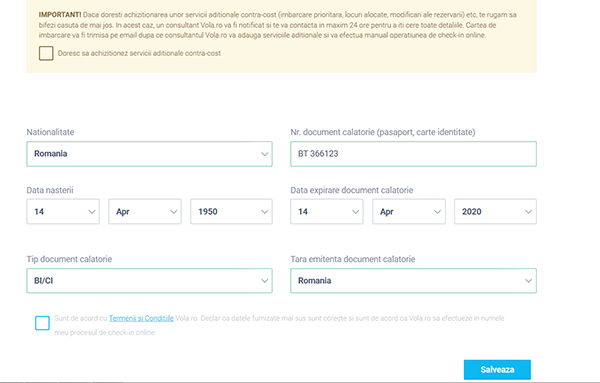
Wizz Air offers passengers a free online check-in service. To avoid additional fees, online check-in is mandatory for all Wizz Air flights, both outbound and return.
If the online check-in service is not yet available at the departure airport, airport check-in will be free until the online service becomes available.
Free online check-in for Wizz Air is available:
Airport check-in opens 2 hours and closes 40 minutes before departure and is subject to an extra fee
The boarding pass received after online check-in is your travel document and must be presented at the airport, boarding gate, border control, and security check. Each boarding pass must be printed on a separate A4 page with the barcode clearly visible. If you arrive at the airport without a printed boarding pass (even if you have it digitally on a mobile device), the airline may apply penalties.
For customers who are unable to check in online, airport check-in is available for €40 per direction.
If you have special requests, special needs, or are traveling with pre-booked assistance, please check in 3 hours before the scheduled departure time to ensure Wizz Air has enough time to complete the check-in process.
The online check-in process includes free random seat allocation. If you want to choose a specific seat, this is possible for an additional fee.
It is your sole responsibility to meet travel requirements. Passengers who do not arrive on time for boarding, for any reason, or who lack required travel documents, are considered no-shows and are not entitled to any refund.
At check-in, you must present your boarding pass (received via email after completing the check-in form), a valid ID (ID card or passport, as applicable), your checked baggage for weighing, and your hand luggage to ensure it complies with size and weight limits.
Remember, you are responsible for obtaining, holding, and presenting all entry, exit, health, or other documents required by law, regulations, or instructions to travel to/from a certain country. The airline reserves the right to refuse carriage to any passenger whose documents are not compliant with travel laws, regulations, or instructions.
*The fee may be changed by the airline at any time.

Attention!
If you do not receive your boarding pass within 4 hours, please contact us at checkin@vola.ro.
Don’t forget that Wizz Air charges extra fees at the airport if you don’t complete your online check-in and bring a printed boarding pass to the gate.
Online check-in is available 30 days up to 3 hours before the flight if your booking was made before August 15, 2017, or if you selected a seat during the booking process on or after that date.
If you did not purchase seats during booking made after August 15, 2017, check-in is only available starting 48 hours before departure. For return flights without seat selection, check-in will open after outbound check-in becomes available, up to 15 days before departure.


Once check-in is complete, just print your boarding passes and bring them with you to the airport.
Don’t forget that Wizz Air charges extra fees if you show up without having completed and printed the online check-in.
